Описание:
OLYMPUS Stream, Designed with Your Workflow in Mind
Keep Your Workflow Streamlined
Build Your Olympus System Your Way
The OLYMPUS Stream software system can be purchased in a variety of packages designed to fit your needs- whether you require the capabilities found in the entry- level OLYMPUS Stream Start or the advanced automation controls found in OLYMPUS Stream Motion. The packages are also expandable with specific application modules to meet unique analysis needs.
There's a right package for your requirements. You can create your system exactly as you wish-your way.
Easily Expand to Future Applications
With the OLYMPUS Stream system, you're prepared not only for today's applications but for tomorrow's as well. Whatever the future may bring, OLYMPUS Stream system solutions will let you keep up with advances in technology.
OLYMPUS Stream Software Adapts to Your Every Requirement
User Interface Function
Dynamic User Interface
Depending on your needs, you can arrange the layout of the tool window to best fit your workflow. You can create customized layouts with all the necessary functions for each activity.
Microsoft Office Integration 
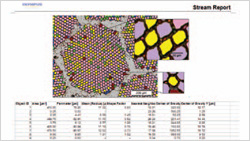
OLYMPUS Stream offers complete integration with Microsoft Word and Microsoft PowerPoint.* This allows for the creation of professional reports and presentations accommodating your company templates including your own headers and footers.
OLYMPUS Stream uses a dedicated menu and toolbar that is integrated into your preferred Microsoft Office package for an improved image handling experience. Tables and graphs can also be easily exported into Microsoft Excel for extended processing. Due to a unique compression method, OLYMPUS Stream ensures your report files are a reasonable size for easier data exchange by email.
*Microsoft PowerPoint Assistant is optional
My Function
You can create intuitive workflows based on the most frequently used functions, simplifying repetitive tasks so that even new users are able to operate the software easily and efficiently.
OLYMPUS Stream Adapts to Your Workflow
Live Image Navigation
Using the OLYMPUS Stream image navigation allows you to pan and zoom on live or stored images. The image navigator interface provides immediate updates of your location on both the zoomed and unmagnified images. The navigation system provides you with fast, immediate displays of your sample before you acquire the image. All image viewing and manipulation is carried out with a clean, simple user interface, providing fast and intuitive results.

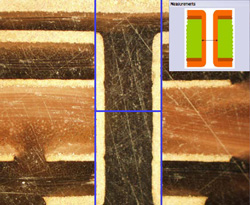
Peeled integrated circuit
HDR Capability
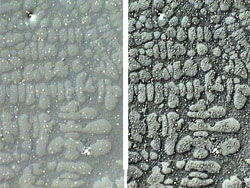
HDR (High Dynamic Range) offers an exceptional level of contrast for microscopic images containing both bright, highly reflective features as well as darker low-reflective features. As an integral part of OLYMPUS Stream software the HDR algorithms automatically acquire a series of images at varying exposure times. Within seconds create a composite image perfectly exposed at every level. This is especially useful for metallurgical microstructures, printed circuit boards, or composite components. HDR imaging is also offered when acquiring stitched, panoramic (MIA) images, or when using the built in Extended Focal Image (EFI) capability to create an image with focus even with varying heights.
Instant Extended Focus Image (EFI)
OLYMPUS Stream software provides images for samples that extend beyond the standard depth of focus. The instant Extended Focus Image allows you to use the fine focus adjustment to combine many images at different z-levels to provide you with a single combined image that is entirely in focus.
Manual Multiple Image Alignment (MIA)
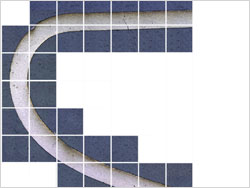
OLYMPUS Stream software provides Multiple Image Alignment (MIA) to enable the creation of panoramic images of samples that extend beyond the field of view. The software then quickly stitches them together, providing you with a seamless image for observation or complex measurement. Simultaneous use of instant EFI is also possible.
*For the appropriate main license for this solution, please refer to the specification table at the end of the brochure.
Digital Reticle
Olympus Offers Solutions to Save You Time
Autofocus
For precise sample focusing and fast image acquisition, OLYMPUS Stream offers two autofocus options. For surfaces with high contrast, OLYMPUS Stream can use its contrast-based software autofocus. For surfaces with low contrast, such as polished or transparent materials, the optional laser autofocus unit is a fast, repeatable option when integrated with the Olympus BXiS microscope system. Both systems provide perfectly focused images with the simple click of a button.
Macro Recorder
OLYMPUS Stream provides a way to preset complex imaging and measuring tasks with the Macro Recorder. The Macro Recorder creates step-by-step processes, which, after completion, are stored and then implemented with a single click. The capability ensures different operators are using the same settings for a consistent output.
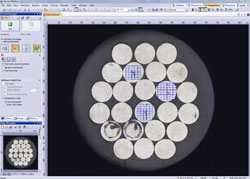
Automatic MIA/EFI
Tilt Compensation
OLYMPUS Stream can recognize a sample's tilt by taking three or more points on the image data when performing automated MIA using motorized systems. This shortens the time while increasing the repeatability when acquiring images.
OLYMPUS Stream Gets You the Image You Want
Surface View
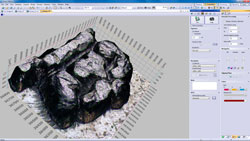
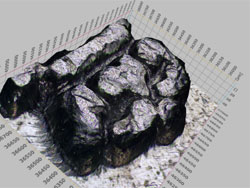
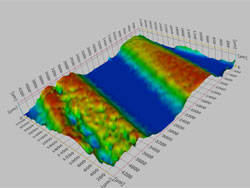
By using the motorized focus unit, sample with different heights can be imaged automatically. In addition, a 3D image can be created that can be measured - using the z-stack data.
* For the appropriate main license for this solution, please refer to the specification table page.
Image Processing
OLYMPUS Stream has a variety of filters for edge detection, smoothing, and other purposes. You can visualize image features by enhancing and modifying your image with a processing filter. For best results, you can check or adjust the filter results in a preview display before making the change. Additionally, image manipulations such as sum, subtraction and erosion are also carried out without losing your original image.
From Simple Measurements to Particle Analysis
Basic Measurement
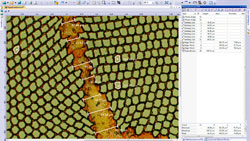
Optical inspection and quality control require frequent measurements. OLYMPUS Stream provides interactive measurement functions such as distances, angles, rectangles, circles, ellipses and polygons. The measurements are made with your mouse and show immediate feedback on the image or in the live data table. All results are saved with the image files as records. To further improve on accuracy, optical settings such as system magnification are automatically recorded when combined with the Olympus Microscope system.
Measurement Result
Included with the OLYMPUS Stream Basic package and other more advanced packages is an integrated data analysis package. The data analysis provides statistical analysis on your data based on your needs. You can calculate mean, standard deviation, min, max, and more. All of the data gathered is exported to Microsoft Excel with a single click.
Magic Wand
OLYMPUS Stream Essentials and other more-advanced packages include a wand for automatically detecting the edges of the sample you wish to measure. The Magic Wand allows you to select the measurement points-free hand for simple or multiple lines, plus free hand polygon measurements for irregularly shaped objects.
Layer Management
Each image as it is captured and annotated is broken into layers (original image, measurement data, annotations etc.), allowing you to change processing files (smoothing and/or sharpening) without affecting your measurement results. You can easily retain your measuring data as you carry out your analysis and measurements.
Traceability
For quality control and traceability recording the conditions of image acquisition is essential. With OLYMPUS Stream, you can quickly create a calibration report for important information such as magnification, objective lens type, pixel size, scale bar, etc. The Info Stamp created from updated calibration information can be overlaid on the acquired image and reports.
Weld Measurement
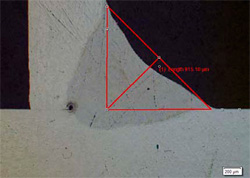
OLYMPUS Stream offers an optional set of measurements dedicated to the measurement of geometric distortion induced by the heating during welding. Asymmetry, Multiple Perpendicular Lines and A-Throat measurements can be conducted with a few simple clicks. This allows detailed and statistical measurements of the welding distortion. These measurements are perfect for assessing the quality of the weld.
*For the appropriate main license for this solution, please refer to the specification page.
Count and Measure
OLYMPUS Stream Provides Intuitive Workflow Interfaces
Expert Measurements with Intuitive Interface and Advanced Automation
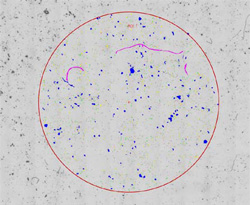
OLYMPUS Stream offers advanced but also intuitive tools to perform complex image analysis tasks quickly, precisely and in compliance with most common international standards. OLYMPUS Stream Materials Solutions integrate the support of motorised stages to speed up your work and conduct advanced measurements on multiple sample locations. Moreover, with the sample alignment function, it is possible to reposition a sample later to run the experiment on the same sample location again. Various scan areas can be defined (requires motorised stage support available in OLYMPUS Stream Motion).

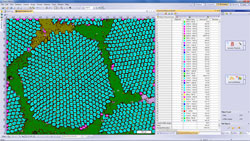
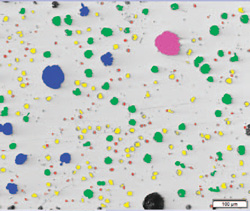
Example: Particle Distribution
Specialized Solutions for Metallography and Materials Science
Particle Distribution
Coating Thickness
Phase Analysis
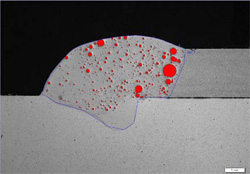
Porosity
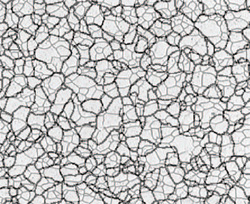
Grains Intercept
Grains Planimetric
Chart Comparison
Inclusions Worst Field
Cast Iron
Layer Thickness
Throwing Power
Automatic Measurement
Olympus Broad Range of Digital Cameras
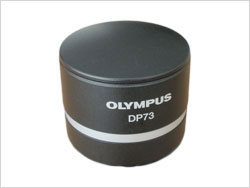
DP73
DP26
This high-resolution 5M-pixel color CCD camera provides optimum true color performance for all industrial applications and imaging techniques. The DP26 incorporates high speed progressive scanning with IEEE1394b connectivity.
DP21
This 2M-pixel color CCD camera can be controlled from a space-saving, intuitively operated hand-switch. The hand-switch incorporates the 12 most frequently used measurement functions for efficient inspection of industrial parts.
> Click here for the Olympus' lineup of digital cameras.
> Click here for the comparison sheet of Olympus' digital cameras.
OLYMPUS Stream Expands to Meet Your Future Needs
Data Management
OLYMPUS Stream workgroup database option is ideal if you need to efficiently browse through thousands of images and other files created in the past, streamlining your workflow from image capture through data management.
OLYMPUS Stream offers an advanced client-server database option based on Microsoft SQL Server technology. It allows you to assign user-definable fields (creation date, project ID, parts number, deadline, and meta-data) on images and other files and folders, permitting efficient data sharing and quick searches. The data structure can be defined for every organization and making data sharing simple and easy. The Workgroup database is an option for OLYMPUS Stream Basic and higher versions.
Stream Document Storage (SDS)
OLYMPUS Stream Document Storage is an automatically installed storage folder for a single workstation that provides a simple structure that can safely store and organize your images. This easy to use database makes finding, sorting and filtering your images quick and simple. It is even possible to search the images for the result of the Material Solution. OLYMPUS Stream Document Storage utilizes the Microsoft SQL Server Express. Stream Document Storage is available starting from OLYMPUS Stream Basic.
Simple Network Connections
The OLYMPUS Stream Netcam solution lets any authorized network user connect to your OLYMPUS Stream PC and visualize the same image in real time with a web browser. What's more, the DP21 also provides self-contained integration into your local network, allowing you to share your work across your office or around the world.
Microsoft Office 2013
Stay up to date with OLYMPUS Stream. The report tool and presentation assistant can use the latest version of Microsoft Office suite.
* Microsoft Office 2003, 2007, 2010 are also supported.
Windows 8
Microsoft Windows 8 (32bit/64bit) is the new standard in operating systems. OLYMPUS Stream fully utilises all of the advanced capabilities for your everyday tasks.
* Microsoft Windows XP, Windows Vista, Windows 7 are also supported.